SMS Program
Last updated: August 12, 2026
What we send
truloop is operated by But Beautiful Co. This page documents how truloop collects consent before sending event notification text messages, and is published so that mobile carriers and reviewers can verify our opt-in process without needing an account.
Event coordination notifications only:
- Invitations to an event you were added to
- RSVP confirmations
- Schedule and venue change alerts
- Announcements written by the organizer of an event you joined
We do not send marketing or promotional messages under this program, and we never contact people who did not provide their own phone number to us.
Program disclosures
Brand: truloop, operated by But Beautiful Co.
Message frequency varies.
Message and data rates may apply.
Reply HELP for help, or email support@butbeautifulco.com.
Reply STOP to opt out at any time. STOP is honored immediately and stops all truloop text messages.
Wireless carriers are not liable for delayed or undelivered messages.
Text messaging originator opt-in data and consent are excluded from all data sharing. This information is not shared, sold, rented or transferred to any third party or affiliate.
How consent is collected
There are exactly two ways a phone number enters our system, and in both of them the number is entered by the person who owns it. We do not use purchased lists, rented lists, or third-party lead sources.
The following disclosure is displayed at every point where we collect a phone number:
“Get truloop event notifications by text message. Message frequency varies. Message and data rates may apply. Reply HELP for help, STOP to opt out. See our Terms of Use and Privacy Policy.”
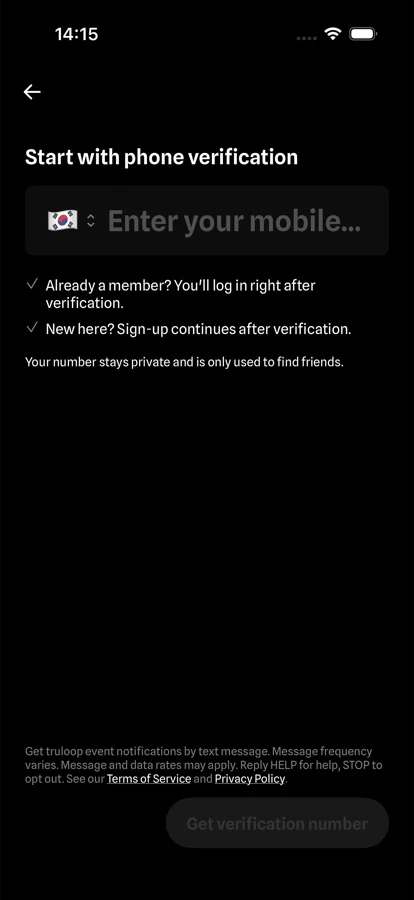
1. App signup
The user enters their own mobile number and verifies it with a one-time code sent to that number. The SMS consent disclosure is shown on the same screen, directly above the Get verification number button.
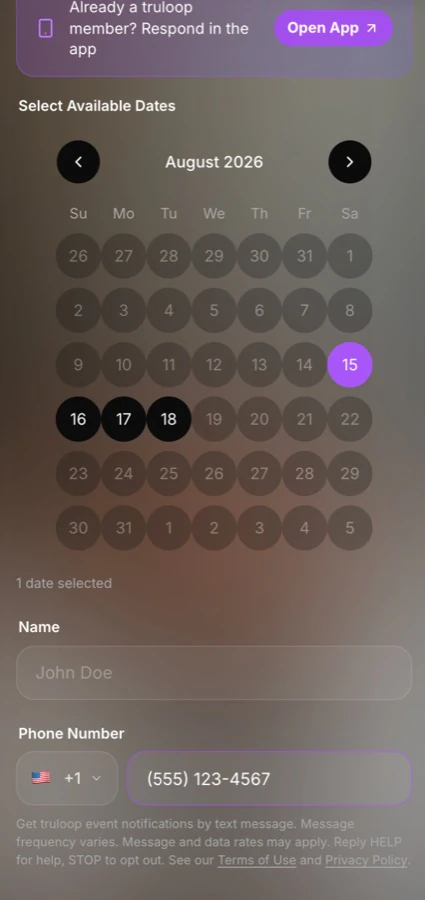
2. Event invite web page
A guest who opens an event invite link enters their own name and phone number to respond to the invitation. The SMS consent disclosure is displayed in plain view directly below the phone number field, above the submit button. It is not hidden in a popup, an accordion, or the terms of use.
How to stop messages
Reply STOP to any truloop text message. Your opt-out is processed immediately and no further text messages are sent. Reply START to resubscribe. Reply HELP at any time to receive our contact information.